


Why Chasing Overdue Payments Takes So Much Time
Late payments create more than a cash-flow problem. They also create administrative work when the customer relationship is managed in Salesforce, but the latest invoice and payment information sits in QuickBooks.
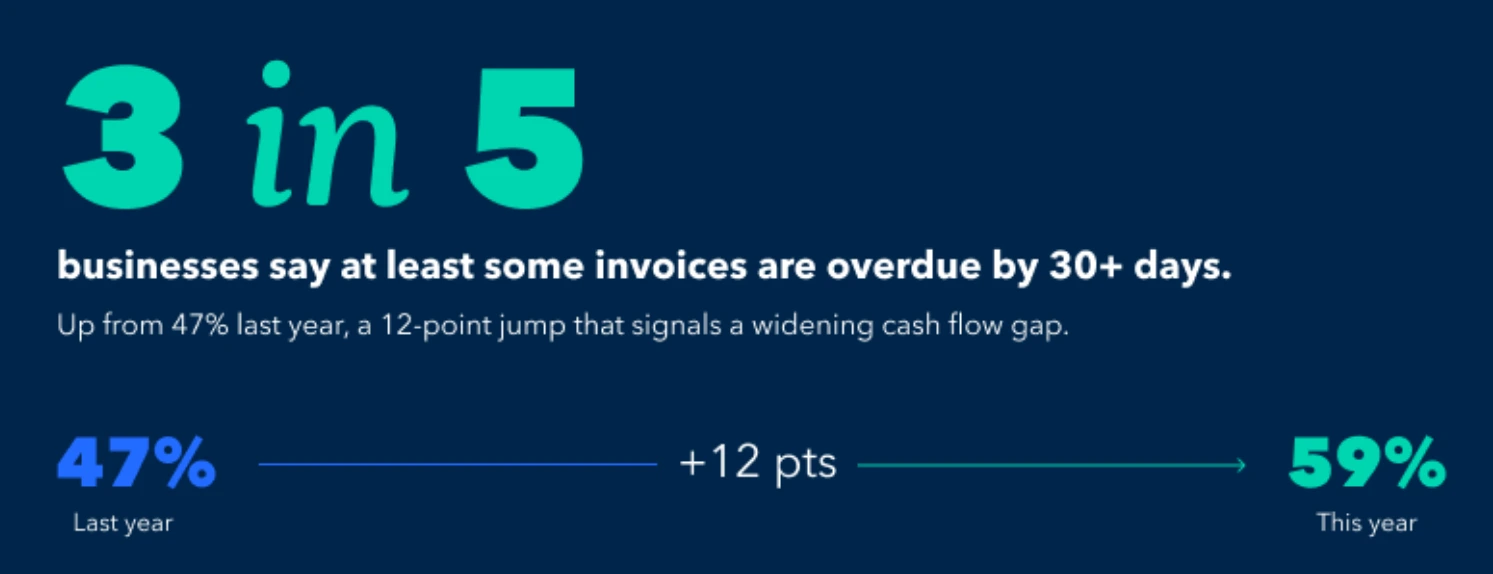
Intuit QuickBooks’ 2026 research found that 59% of businesses had at least some invoices overdue by 30 days or more, up from 47% the previous year. Businesses waiting on unpaid invoices were owed $17,700 on average.
For sales and account teams, an overdue invoice can trigger another information check. Before deciding whether to contact a customer, a user may need to open QuickBooks, ask someone in finance, or check a separate spreadsheet or report to confirm the outstanding amount, payment status, or number of days overdue.
One lookup may take only a few minutes. The problem grows when the same checks are repeated across dozens of accounts. Staff spend time checking information before they can act, while finance receives recurring requests for information that already exists in the accounting system.
The process can become harder when follow-up rules are unclear. The team still needs to determine which invoices require attention, when to contact the customer, and when an unresolved invoice should be escalated. Without a shared view of current invoice status, teams can also duplicate follow-ups or delay them.
Reducing the time spent on payment follow-up therefore starts with two things: giving the right Salesforce users access to current accounting information and defining a clear process for acting on it.
What a Salesforce QuickBooks Integration Changes for Collections
Connecting Salesforce with QuickBooks can make invoice information available to the sales and account teams working with customers in Salesforce. Instead of keeping customer activity in Salesforce and invoice and payment status in a separate system, selected QuickBooks data can appear alongside the Salesforce records those teams already use.
Insight: Digital tools can also play a role in collections. In QuickBooks’ 2026 research, 26% of business owners said their most useful digital tools help them chase and collect money owed on unpaid invoices faster.
There are several ways to connect the systems. A company can build a custom integration, use middleware or an integration platform, or install an AgentExchange application designed for this purpose. The right approach depends on the company’s systems and requirements. For collections, the practical goal of a QuickBooks accounting integration is to make relevant invoice information available without changing where finance manages the books.
One example is Breadwinner, a Salesforce-native AgentExchange option. This Salesforce QuickBooks connector brings QuickBooks records into Salesforce and can keep invoice information synchronized between the systems. This lets finance continue working in QuickBooks while other teams use Salesforce during customer follow-up. Businesses evaluating this solution can learn more about its features and capabilities in this Breadwinner for QuickBooks review.
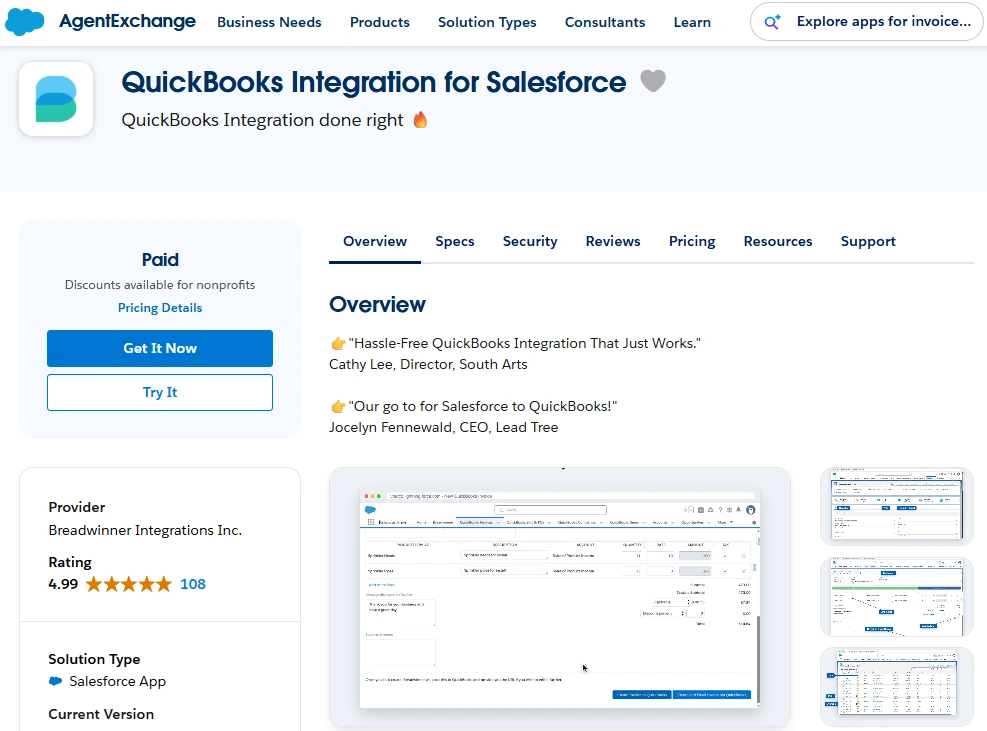
QuickBooks Integration for Salesforce on AgentExchange
Companies that sync Salesforce and QuickBooks still need to define their own collection rules, including when follow-up begins, how existing Salesforce ownership is used, and when an overdue invoice should be escalated.
How QuickBooks Invoice Tracking Helps Teams See What Needs Attention
For payment follow-up, users need enough information to decide whether an account requires attention. A practical Salesforce view can include the related Account, invoice number, due date, outstanding amount, and whether the invoice is due, overdue, or paid.
With Breadwinner for QuickBooks, invoice records and their status can be available inside Salesforce. This QuickBooks Salesforce integration allows users to review invoice status and balance information next to the customer record instead of opening QuickBooks for every check. Breadwinner also uses Salesforce permissions, so access to financial information can be limited to the users who actually need it.
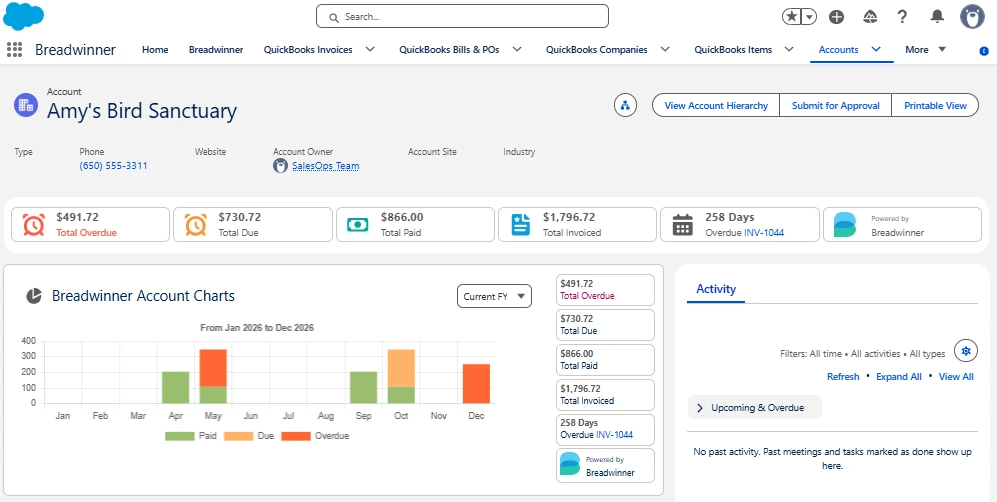
Breadwinner Account view in Salesforce showing overdue, due, paid, and invoiced totals, plus overdue days
The exact payment information available can depend on the subscription and configuration, so a QuickBooks Salesforce connector should be evaluated against the specific collection data the team needs. Invoice status, due date, and outstanding amount already provide the basic information required to identify which customers need attention.
How to Build an Overdue Invoice Collection Workflow in Salesforce
Once overdue invoice data is available in Salesforce, the team can identify which accounts need attention, prioritize them using agreed criteria, and automate routine follow-up.
Prioritize the Accounts That Need Follow-Up
Start by separating invoices that require action from those that are already paid or resolved. Salesforce reports and list views can help users organize records by criteria such as overdue status, days past due, outstanding amount, Account owner, or rules defined by the business.
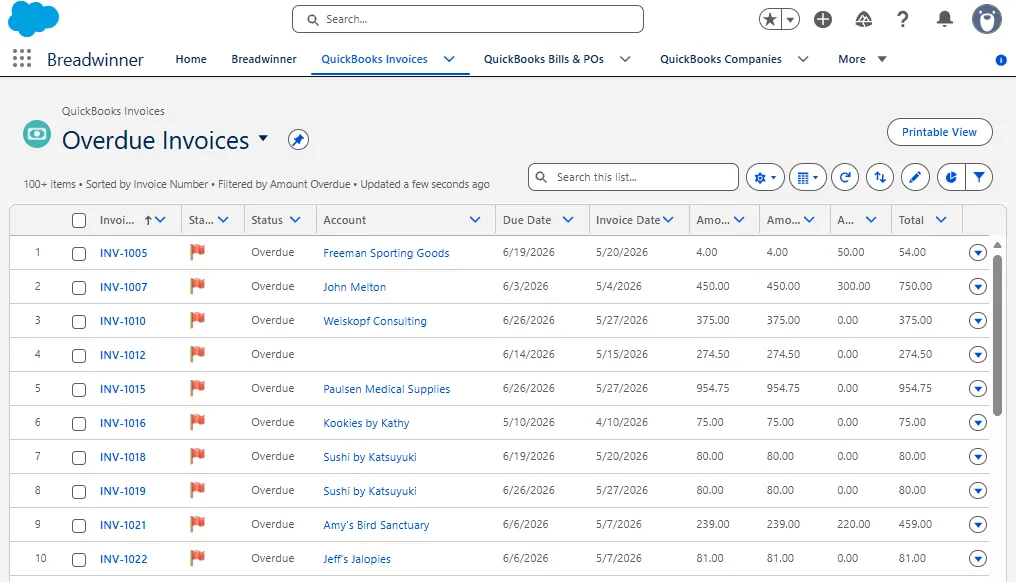
Salesforce users can review overdue QuickBooks invoices in one list
There is no single priority formula that works for every company. A large balance may require faster attention in one business, while another may focus first on how long an invoice has been overdue. The useful part is that synchronized invoice data can be filtered and reviewed together with the customer information already stored in Salesforce.
Keeping that context visible also helps before contacting the customer. The person responsible for follow-up can review recent activity, account ownership, and other relevant CRM information before deciding what action to take.
Use Automation to Support Follow-Up
In many Salesforce orgs, the Account owner is already the person responsible for the customer relationship. Once overdue invoice information is available in Salesforce, the workflow can use that existing ownership.
Salesforce reports can summarize overdue invoice data and help teams monitor what requires attention. Tasks, notifications, and Salesforce Flow, the platform’s automation tool, can then support the follow-up process. For example, a Flow can create a task for the Account owner when an invoice meets the company’s overdue criteria or notify another team when an invoice reaches an escalation point. Breadwinner supplies the financial records that Salesforce reporting and automation can use.
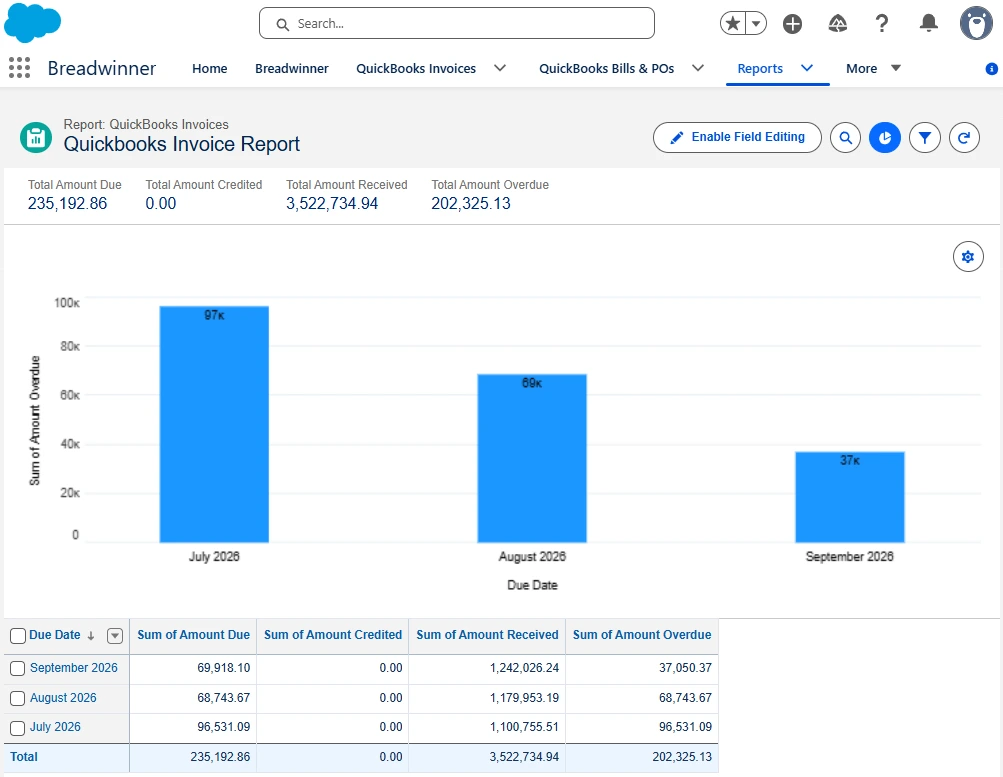
Salesforce report showing QuickBooks invoice amounts due, received, and overdue by due date
The automation should also respond when the invoice status changes. If an invoice is paid or otherwise resolved, related tasks or notifications should stop or move to the appropriate state. Testing paid, overdue, and exception cases helps prevent unnecessary follow-up.
What the UKGBC Example Shows About Reducing Collection Admin
The UK Green Building Council (UKGBC) shows what reducing that work can look like in practice. The membership organization managed customer and membership information in Salesforce while its financial records were handled in QuickBooks.
| How UKGBC’s Invoice and Collection Process Changed After Integration | ||
| Area | Before the Integration | After the Integration |
| Invoice preparation | Staff downloaded member lists from Salesforce, created invoices through mail merge, and entered the information into QuickBooks. | Invoices could be created from Salesforce. |
| Checking overdue accounts | Staff moved between systems to determine who owed what and when. | Payment status was available in Salesforce, making outstanding invoices easier to identify. |
UKGBC reported that debtor chasing took 30% of the time it had taken before, a 70% reduction. The organization also saved 20% of sales staff time.
Those results reflect UKGBC’s own process and implementation, but they illustrate how making payment status available in Salesforce can reduce administrative work around customer follow-up.
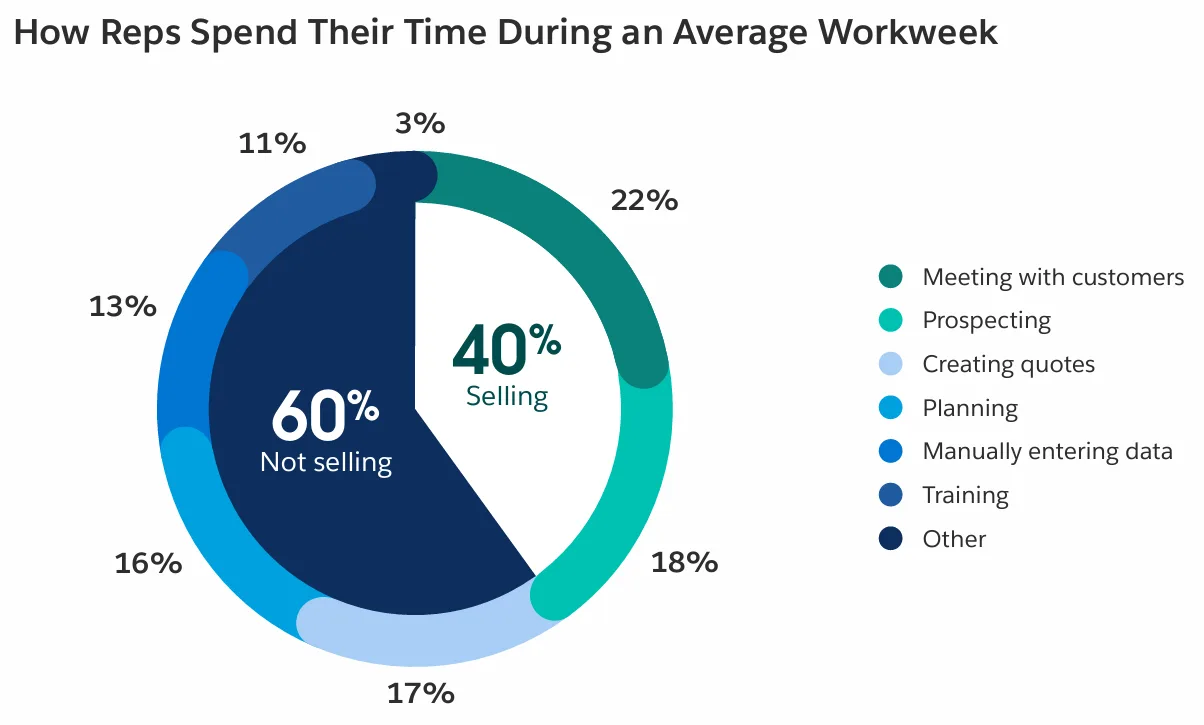
That time saving is relevant beyond collections. Salesforce’s 2026 State of Sales research, based on more than 4,000 sales professionals, found that the average seller spends only 40% of their time actually selling. Reducing routine collection admin can help preserve more time for customer-facing work when sales or account teams are involved in payment follow-up.
Extend QuickBooks Access to Slack for Quick Answers
Quick finance questions often come up during everyday team conversations. Someone in Slack may need to know whether a customer has paid, what balance is still open, or which invoices are more than 30 days overdue. They may want that answer without opening QuickBooks or asking finance to check.
One example is Kipper, which provides a read-only way to integrate QuickBooks with Slack for these ad hoc lookups. Approved users can type plain-English questions directly in Slack, and Kipper returns answers from QuickBooks in around five seconds. Users do not need their own QuickBooks login. Administrators can control access, and query activity is logged.
Kipper answers QuickBooks questions directly in Slack. Image source: Kipper
This gives teams a self-service option for routine finance questions that arise during day-to-day communication, without asking finance or accounting staff to look up each answer.
Keep the Collection Process Reliable over Time
A Salesforce and QuickBooks integration needs clear data, access, and process rules to keep the collection workflow reliable as the business changes.
- Keep system responsibilities clear. Finance should continue recording accounting activity in QuickBooks, while Salesforce users work with the synchronized information needed for customer follow-up. Access to financial data in Salesforce should remain limited to the appropriate users.
- Check data and automation. Confirm that customer records are matched correctly and understand how frequently the information used for follow-up is updated. Test reports and Flow logic against paid, overdue, and other exception cases defined by the billing process.
- Review the workflow as the business changes. Revisit collection rules when billing processes, permissions, Salesforce objects, or team responsibilities change. Users should also understand what each invoice status means and what action it should trigger.
FAQs About Salesforce and QuickBooks Payment Follow-Up
Can QuickBooks integrate with Salesforce?
Yes. Businesses can connect QuickBooks and Salesforce through custom development, middleware or an integration platform, or a Salesforce marketplace application such as Breadwinner. The right approach depends on the data and workflow the business needs to connect.
How can I see QuickBooks invoice and payment status in Salesforce?
With an integration such as Breadwinner, Salesforce users can see QuickBooks invoice information such as due dates, outstanding amounts, and due, overdue, or paid status alongside customer records. The exact payment information available can depend on the Breadwinner subscription and configuration.
How can I track overdue QuickBooks invoices in Salesforce?
Breadwinner can bring QuickBooks invoice data into Salesforce, where reports and list views can organize overdue invoices by days past due, outstanding amount, Account owner, or other business criteria. Users can then review invoice information alongside customer activity before deciding what follow-up is needed.
Can Salesforce automate overdue invoice follow-up?
Yes. With Breadwinner, synchronized QuickBooks financial records can be used by Salesforce automation. Salesforce Flow can create tasks, send notifications, or support escalation when an invoice meets the company’s overdue criteria, while the automation can also respond when an invoice is paid or otherwise resolved.
Can I check QuickBooks invoice information in Slack?
Yes. Kipper gives authorized users read-only access to QuickBooks information through plain-English questions in Slack, with answers coming back in around five seconds. Users can ask whether an invoice has been paid or which invoices are overdue without having their own QuickBooks login, and administrators can control access to the information.
Make Payment Follow-Up a Shared Salesforce Workflow
Reducing payment follow-up work requires both invoice visibility and a clear process for deciding which accounts require attention and what happens next. When customer context and current invoice information are available in the same working environment, sales and account teams can spend less time checking status and more time acting on the accounts that actually need follow-up.
Breadwinner is one way to bring relevant QuickBooks information into Salesforce, while Salesforce provides the reports, ownership, tasks, and automation used to organize that work.
The practical starting point is to define what users need to see, who should act, and when an overdue invoice should be escalated. Once those rules are clear, automation can support the repetitive parts of the process without taking control away from the people managing the customer relationship.