


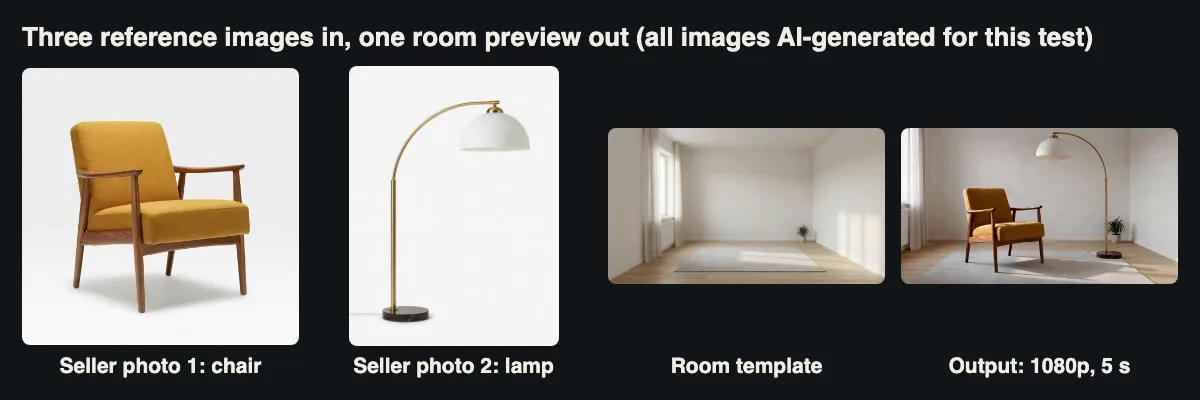
Three reference images in, one room preview out. The product photos were also AI-generated for this test.
One of our clients runs a resale marketplace for second-hand furniture. I’ll call it Settle; the name and the people are made up for this article. Sellers upload a couple of phone photos of a chair or a lamp, and the product team wanted a short clip of the item standing in a furnished room on the listing page. My job was the backend: take the seller’s photos, call a video generation API, store the result and keep the bill predictable.
We used Vidu Q4 Preview (model ID viduq4-preview) in its reference-to-video mode, which takes several images and a prompt and composes them into one shot. Before writing the production code I ran a measured set of tests against the live API: bad requests, reference handling, a missing image, resolutions, a small burst, polling, seeds and a Node client. Thirteen jobs ran, twelve were billed, and the total was $2.76. Sample sizes are small, so treat every timing as one observation.
The shape of the API
It is a two-call asynchronous API. POST /v1/videos/generations returns a task ID in data[0].task_id. GET /v1/tasks/{task_id} returns pending, processing, completed or failed, and on completion a video URL, the charge in cost, actual_time and an expires_at timestamp. The docs describe polling only; I found no webhook option, so our worker polls.
The model picks its mode from the inputs. One image, or an image marked first_frame, means image-to-video. Two or more images, or any image marked reference_image, means reference-to-video, which also needs a prompt and accepts up to 15 images and up to 3 MP3 clips. Duration is a whole number from 3 to 16 seconds, resolution is 540p, 720p, 1080p, 2K or 4K, and aspect_ratio only applies to reference-to-video. There is no text-only mode and no last frame.
Test 1: what fails at submit time
I sent eleven malformed requests on purpose. All came back as HTTP 400 in 0.6 to 0.8 seconds, with a message that names the problem, and none created a task or a charge.
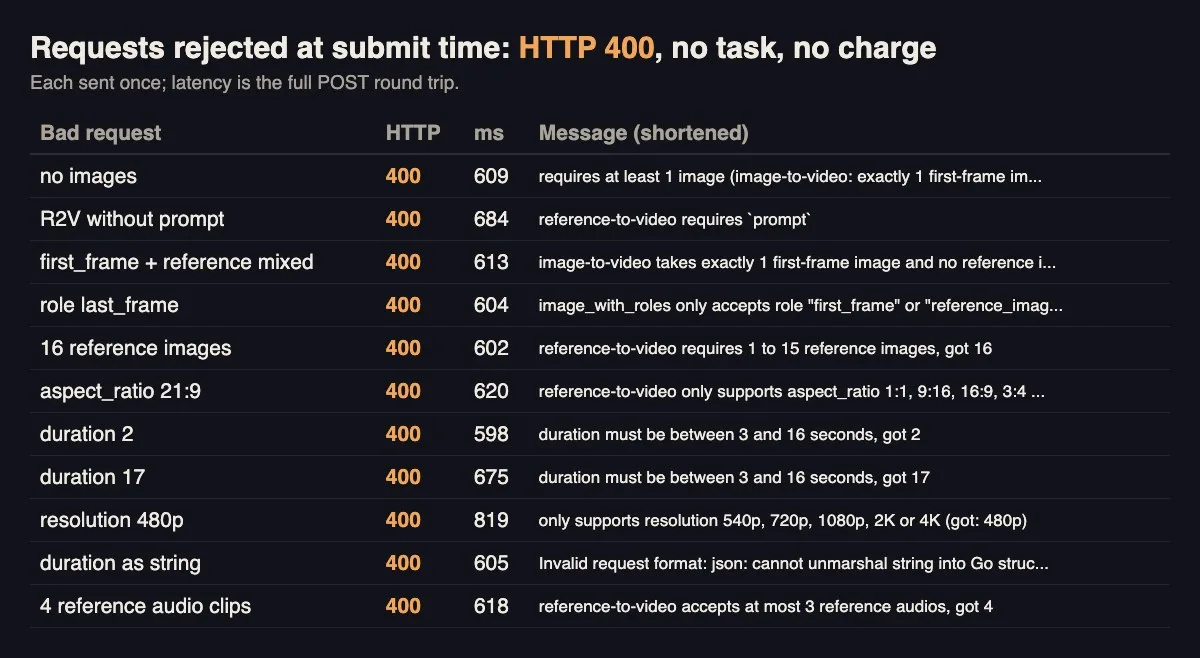
Mixing a first frame with references, 16 images, 21:9, 2 or 17 seconds, 480p and a string duration were all rejected up front.
Our service validates the same rules before the call, because a seller’s request should fail in our own UI with our own wording. The provider’s 400 is the second line of defence, and we log its message verbatim.
Test 2: the cheapest real job
The probe was image-to-video with the chair photo, 3 seconds at 540p, audio off. The POST returned in 0.65 seconds. The task completed after 115 seconds and cost $0.1344, which is 3 seconds at $0.0448 per second, the 540p rate on the model page. Because image-to-video follows the first frame’s shape, the square seller photo produced a square 720×720 clip, 0.49 MB. If your UI expects 16:9, don’t send square photos as a first frame.
progress sat at 50 until the end and estimated_time said 300 on every task, so the seller sees an elapsed timer instead.
Test 3: one reference versus three
Same seed, 540p, 5 seconds, 16:9, silent. With only the chair, marked as reference_image, the prompt asked for “a bright living room”. With three references (chair, lamp, empty room template) the prompt was:
The mustard armchair from image 1 and the brass arc floor lamp from image 2 stand together on the grey rug in the empty living room from image 3. Slow dolly-in from the doorway, soft morning light through the sheer curtains, no people.

With one reference the model furnished its own room, sofa included. With a room template it used ours.
The single-reference clip invented a room with a sofa and a side table, which on a marketplace is a problem: buyers might think the sofa is part of the listing. The three-reference clip put both items into our empty room with the right curtains, rug and plant. The chair’s shape, wood and fabric matched the seller photo well in both. So the product decision was easy: we always send a neutral room template as the last reference, and the prompt names each image by position.
Timing was 156 seconds for one reference and 166 for three, both $0.224. More references did not cost more, because you pay per second of output, at a rate set by resolution.
Test 4: where reference images live
References can be public URLs or base64 data URLs, but the docs recommend public URLs and cap a base64 request body at 20 MB. We store uploads in our own bucket and pass short-lived signed URLs, so the request body stays a few hundred bytes. The catch is that the provider has to fetch those URLs, so they must be reachable from the public internet and must not expire before the job starts.
To see what happens when a fetch fails, I sent a job whose third reference URL pointed at a file that did not exist. It was accepted with HTTP 200 and a task ID. Twenty-one seconds later the task moved to failed with an image download error, and the cost was 0, refunded automatically. That is a slow failure compared with a 400, so our worker now does a HEAD request on every reference URL before submitting, and it signs URLs with a one-hour expiry rather than five minutes.
Test 5: resolution, file size and storage
The three-reference request went out at 540p, 720p and 1080p. All three were H.264 at 24 fps. The 540p setting gave 960×528 rather than 960×540, which is worth knowing if your player or thumbnail code assumes exact sizes.

File size roughly quadruples from 540p to 1080p; the charge a little more than doubles.
Sizes for 5 seconds were 0.68 MB, 1.70 MB and 2.87 MB, at $0.224, $0.456 and $0.512. Generation time rose a little with resolution: 166, 176 and 186 seconds. Downloads took 1.7 to 8.5 seconds from our test machine. We generate at 720p for listings; at about 1.7 MB per clip, ten thousand listings is roughly 17 GB.
The task’s expires_at was exactly 24 hours after completion on every job I checked. We copy the file to our bucket as soon as the task completes and never hand the provider’s link to a browser.
Test 6: audio on or off
I ran the three-reference job once more with audio: true, using the Node client shown further down. It cost the same $0.224, as the Vidu Q4 reference-to-video API page says it should, and the file gained a 128 kbit/s AAC track. The track was close to silent, -59.7 LUFS integrated, and a transcription pass found no speech. Listing clips autoplay muted anyway, so we send audio: false and keep the files smaller.
Test 7: a burst, and what the seed does
I submitted four 3-second 540p jobs at once: two with seed 42, one with seed 7 and one with seed 0 (random). All four POSTs returned in under 0.9 seconds and there were no 429 responses. They finished after 166, 166, 166 and 176 seconds.
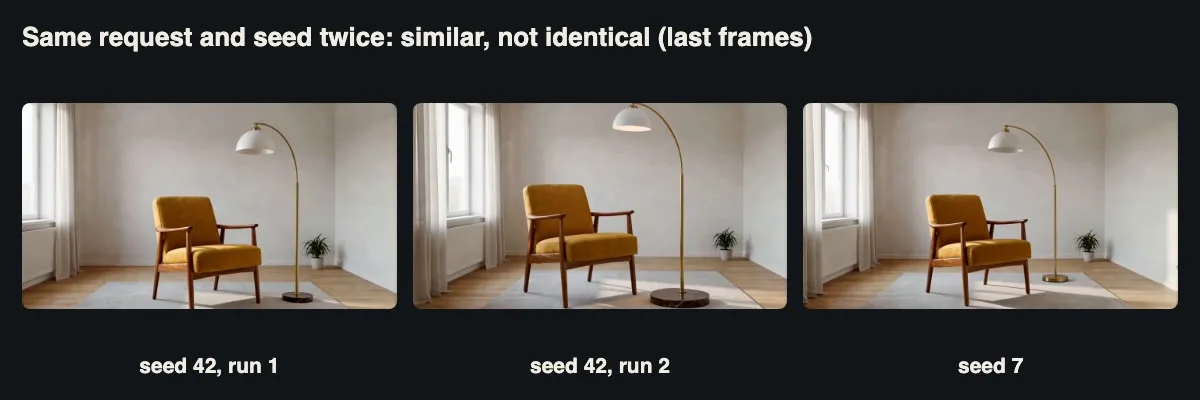
Two runs with seed 42 differ in lamp size and position. A seed is not a cache key.
The two seed-42 clips were not identical. They had different file sizes, and the structural similarity between them (SSIM 0.685 after scaling) was no higher than between seed 42 and seed 7 (0.727). So the seed cannot be used to regenerate a lost file. We store the file itself and treat each generation as unrepeatable.
Test 8: polling and the status endpoint
The harness polled every 5 seconds, which gave 21 to 33 GETs per job. Across 303 polls the median response was 0.61 seconds and the 95th percentile 0.85 seconds. I then hit the status endpoint 60 times on a finished task from four threads (6.2 requests per second). All 60 returned 200, median 0.62 seconds, worst 0.91 seconds. The production worker waits 30 seconds, then polls every 10: 14 polls on the Node run.
Test 9: reference drift
The model kept the chair faithful across every clip, but the lamp drifted. Its black marble base came out brass in some clips, and the 10-second clip ($0.448, 186 seconds) grew a second lamp head partway through. For a resale listing, a wrong base colour is a misdescription.

Errors a reviewer has to catch before a clip goes live.
So clips are generated as drafts, shown to the seller for approval, and labelled as generated previews on the listing. Long clips are off: we cap duration at 5 seconds, where we saw fewer problems.
The job design
The production flow is a queue table and a worker. The worker validates the inputs, HEAD-checks the reference URLs, checks the spending cap, submits, and writes the task ID to the row before it polls. When the task completes it downloads the file to our bucket, records cost and actual_time, and marks the row done. A failed task is recorded with its error message and is retried at most once, with a fresh signed URL, because the failures we saw were input problems that a blind retry would repeat.
The POST is never retried automatically: I found no idempotency key, and the docs say to keep querying the original task ID after a timeout rather than resubmit.
This is the Python core of the worker, simplified from the test harness I actually ran, with the database calls left out:
import os, time, requests


BASE = os.environ["VIDEO_API_BASE"]           # provider host, no trailing slash

HDRS = {"Authorization": "Bearer " + os.environ["VIDEO_API_KEY"]}

RATE = {"540p": 0.0448, "720p": 0.0912, "1080p": 0.1024}   # USD per second


def submit(job, spent_today, cap=20.0):

assert 3 <= job["duration"] <= 5 and job["resolution"] in RATE

assert 1 <= len(job["image_urls"]) <= 15 and job.get("prompt")

for u in job["image_urls"]:

requests.head(u, timeout=10).raise_for_status()   # fail fast on dead links

est = RATE[job["resolution"]] * job["duration"]

if spent_today + est > cap:

raise RuntimeError("daily video cap reached")

r = requests.post(f"{BASE}/v1/videos/generations", headers=HDRS,

json={"model": "viduq4-preview", "audio": False, **job}, timeout=60)

r.raise_for_status()                       # never retried automatically

task_id = r.json()["data"][0]["task_id"]

save_task(task_id, est)                    # persist before polling

return task_id

And this is the Node module I ran for the audio test, minus its small command-line entry point. It needs Node 18 or later for the built-in fetch:

import { writeFile, appendFile } from "node:fs/promises";


const BASE = process.env.VIDEO_API_BASE;          // e.g. the provider's https host, no trailing slash

const HDRS = { Authorization: `Bearer ${process.env.VIDEO_API_KEY}`, "Content-Type": "application/json" };

const sleep = (ms) => new Promise((r) => setTimeout(r, ms));


export async function submit(job) {

const t0 = performance.now();

const res = await fetch(`${BASE}/v1/videos/generations`, { method: "POST", headers: HDRS, body: JSON.stringify(job) });

const body = await res.json();

if (!res.ok) throw new Error(`submit ${res.status}: body?.error?.message??JSON.stringify(body)`);consttaskId=body.data[0].taskid;awaitappendFile("tasks.log",`{new Date().toISOString()}\t${taskId}\n`);   // persist before polling

return { taskId, submitMs: Math.round(performance.now() - t0) };

}


export async function waitFor(taskId, { first = 30_000, every = 10_000, limit = 900_000 } = {}) {

await sleep(first);

const t0 = Date.now();

let polls = 0;

while (Date.now() - t0 < limit) {

polls++;

try {

const res = await fetch(`${BASE}/v1/tasks/${taskId}`, { headers: HDRS });

if (res.status === 429) { await sleep(30_000); continue; }

const { data } = await res.json();

if (["completed", "failed", "cancelled"].includes(data.status)) return { ...data, polls };

} catch (e) {

console.warn("poll error, retrying:", e.message);

}

await sleep(every);

}

throw new Error(`gave up waiting on ${taskId}; keep the ID and check again later`);

}
That run printed submitMs: 682, actual_time: 166, cost: 0.224 and polls: 14.
Measured latency and cost, all jobs
| Job | Submit | Server time | Size | Charged |
| I2V, 540p, 3 s | 0.65 s | 115 s | 0.49 MB | $0.1344 |
| R2V 1 ref, 540p, 5 s | 0.65 s | 156 s | 0.85 MB | $0.224 |
| R2V 3 refs, 540p, 5 s | 0.83 s | 166 s | 0.68 MB | $0.224 |
| R2V 3 refs, 540p, 5 s, audio (Node) | 0.68 s | 166 s | 0.82 MB | $0.224 |
| R2V 3 refs, 720p, 5 s | 0.64 s | 176 s | 1.70 MB | $0.456 |
| R2V 3 refs, 1080p, 5 s | 0.65 s | 186 s | 2.87 MB | $0.512 |
| R2V 3 refs, 540p, 10 s | 0.66 s | 186 s | 1.24 MB | $0.448 |
| Burst, 4 x 540p, 3 s | 0.65 to 0.86 s | 166 to 176 s | 0.40 to 0.46 MB | $0.1344 each |
| Missing reference image | 0.81 s | failed at 21 s | none | $0 |
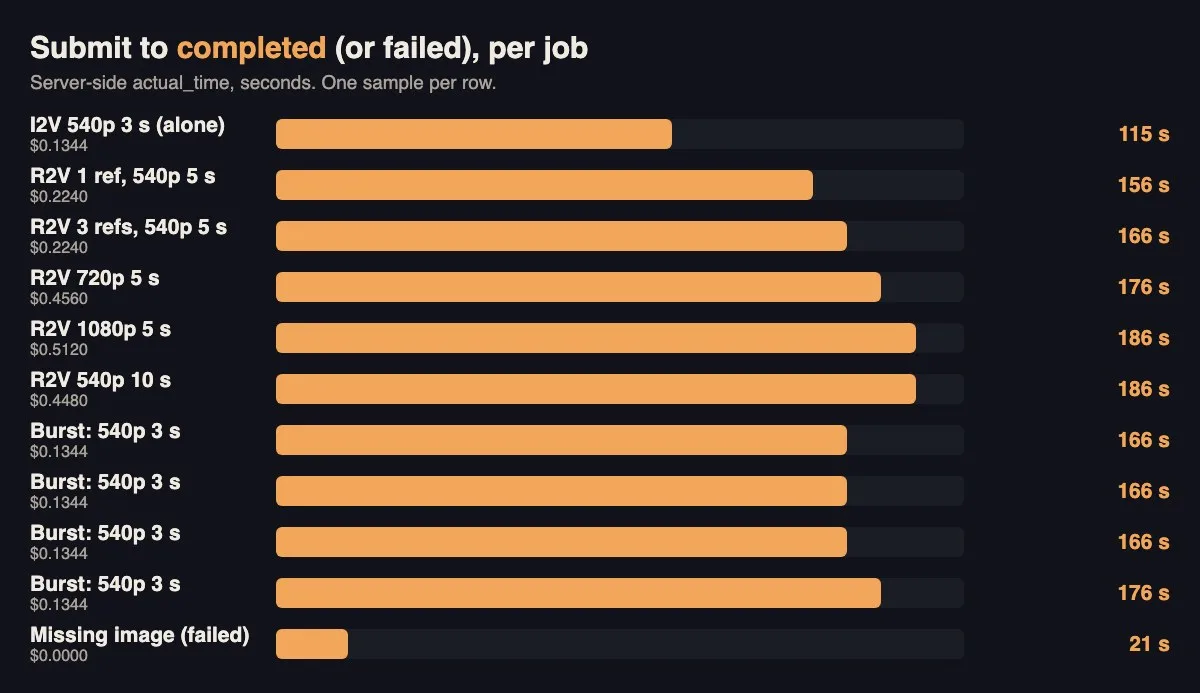
Two to three minutes per clip at these settings; the failed job surfaced in 21 seconds.
Every charge equalled duration times the listed per-second rate for the chosen resolution, so the estimate in our submit function and the cost field on the finished task agreed to the cent on all twelve billed jobs. We store both and alert if they ever differ.
Cost guardrails
A per-second video API can spend money fast if a loop or a leaked key goes wrong, so the limits are layered. Duration is capped at 5 seconds and resolution at 1080p in code. A daily cap is checked before every submit. Each listing gets one free preview and one regeneration. The key belongs to one service account and is never logged.
A short walkthrough
Narrated summary of the tests, with the generated clips.
Checklist
- Pass references as public signed URLs with enough lifetime, and HEAD-check them first.
- Always include a neutral scene reference, or the model invents its own.
- Save the task ID before polling; never auto-retry the POST.
- Copy the file to your own storage within the 24-hour window.
- Store files, not seeds. The same seed did not reproduce a clip.
- Estimate cost before submitting, compare with the returned cost, and enforce a daily cap.
- Keep a human approval step for product details.
The bottom line
As an integration target, Vidu Q4’s reference-to-video mode is straightforward: two endpoints, clear 400s for most mistakes, charges that match the price list, and a status endpoint that stayed fast under modest load. The engineering work is the usual work for any paid asynchronous API, plus two things specific to image-driven video: making sure the provider can fetch your reference images, and catching the cases where it changes a product detail. For Settle the clips are good enough to show a chair in a room, and a seller still confirms every one before buyers see it.