

For companies that need CPQ in Salesforce, the options have changed. Salesforce CPQ reached end of sale for new customers in March 2025, and Salesforce now positions Revenue Cloud (now Agentforce Revenue Management) as its solution for product configuration, pricing, quoting, orders, subscriptions, and other revenue processes. Existing Salesforce CPQ customers can still use, renew, and add users to the product, but it is no longer available as a new option.
The problem is that a company may not need everything Revenue Cloud offers. A sales team might mainly need to configure products, calculate prices and discounts, and create professional quotes, while billing or invoicing is already handled in another system. In that case, the cost of a broader Revenue Cloud solution can be difficult to justify when a large part of its functionality will not be used.
That makes it worth looking at what your sales team actually needs and what other options are available. If the main requirement is CPQ and quoting, is Revenue Cloud the only option, or could a Salesforce CPQ tool provide the required functionality at a lower cost?
Why Companies Look for Salesforce Revenue Cloud Alternatives
Before looking at ways to reduce the cost, it is worth understanding why companies can look for Revenue Cloud alternatives. The issue is not simply the price. The bigger question is whether the functionality included in that price matches what the business actually needs.
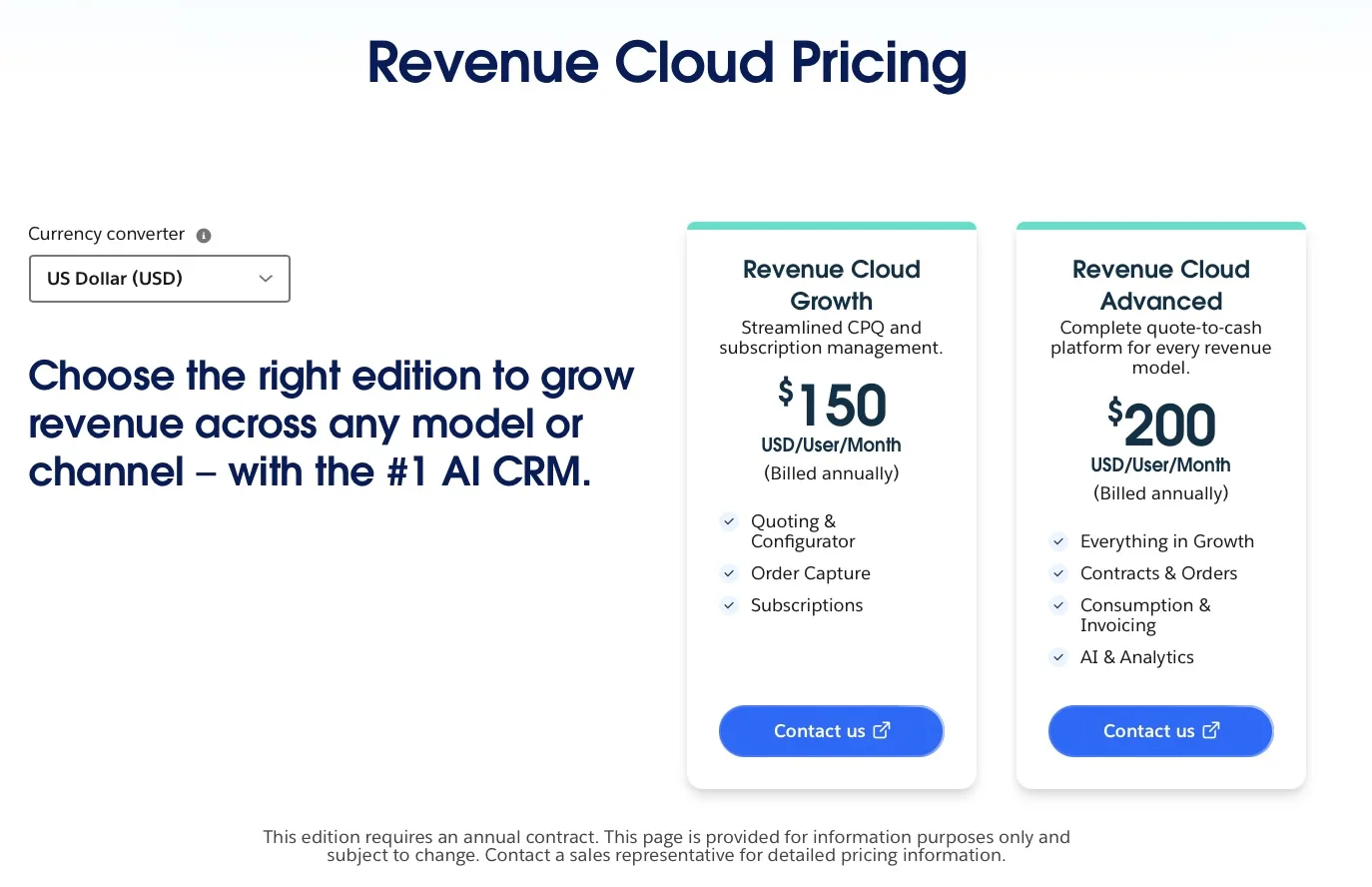
So, how much does Revenue Cloud cost? Revenue Cloud covers a broad part of the revenue lifecycle and currently offers two main editions: Revenue Cloud Growth and Revenue Cloud Advanced.
Revenue Cloud Growth costs $150 per user per month, while Revenue Cloud Advanced costs $200 per user per month, with both prices listed by Salesforce for annual contracts.
Salesforce Revenue Cloud cost, image from Salesforce
But the subscription is not the only cost to consider. Subscription fees can account for only 50-70% of the true annual SaaS cost, with the rest going toward implementation, training, internal resources, integration maintenance, and other expenses.
Revenue Cloud is not something a company simply purchases and starts using without additional work. The implementation can require Salesforce specialists who understand the platform, including solution architects, Salesforce consultants, and developers, depending on the complexity of the setup.
There can also be costs for:
- Implementation and consulting: designing the solution, configuring Revenue Cloud, and adapting it to the company’s sales and revenue processes.
- Development: building custom functionality or integrations where standard configuration is not enough.
- Data migration: preparing and moving existing product, pricing, customer, and other relevant data.
- Testing and deployment: validating pricing rules, product configurations, quoting processes, and integrations before going live.
- Ongoing administration: maintaining the configuration, updating pricing and product rules, troubleshooting issues, and supporting users.
These costs matter when the business only needs a specific part of what Revenue Cloud provides. If the main requirement is to configure products, calculate prices and discounts, and create quotes, the company may be paying for a broader platform and implementation effort than its sales process actually requires.
How to Reduce Revenue Cloud Cost
There is no single way to reduce the cost of Revenue Cloud. The right approach depends on what the company needs from Salesforce and how much of the revenue process it wants to manage in the platform.
Here are several ways to reduce the investment or avoid paying for functionality that is not required.
1. Choose the Right Revenue Cloud Edition
If Revenue Cloud is still the right platform for your business, start by checking whether you need Growth or Advanced. Choosing the lower edition when it covers your requirements avoids paying for capabilities your team will not use.
If the lower edition meets the business requirements, there may be no reason to pay for the additional capabilities included in Advanced.
2. Reduce the Number of Licensed Users
Revenue Cloud is priced per user, so the number of licensed users directly affects the subscription cost.
Not everyone involved in the sales process necessarily needs to create or manage Revenue Cloud records. Reviewing who actually needs a license can therefore reduce the recurring cost without changing the platform itself.
3. Use Salesforce Functionality You Already Have
Another option is to use standard Salesforce capabilities for parts of the process that do not require Revenue Cloud.
For example, a company may already use Salesforce Products, Price Books, Opportunities, Quotes, approvals, Flow, and other standard CRM functionality. If these capabilities are sufficient for a particular part of the sales process, the company may not need Revenue Cloud for that part of the process.
4. Build Only the Missing Functionality
A company can also choose to build specific functionality in Salesforce instead of adopting the full Revenue Cloud platform.
For example, if standard Salesforce handles most of the sales process but lacks a specific quoting function, the company could develop only that missing part. The advantage is control over what gets built. The disadvantage is that the company becomes responsible for development, testing, security, upgrades, and ongoing maintenance.
Custom development can therefore reduce the software subscription cost while increasing the internal or consulting investment. It should be evaluated as a total cost, not simply as a way to avoid a Revenue Cloud license.
5. Choose a Salesforce AppExchange Solution
Another option is to use an application from AppExchange (now AgentExchange), Salesforce’s marketplace for applications that extend the platform. There are solutions for CPQ, quoting, pricing, document generation, billing, and other Salesforce processes.
However, AppExchange does not automatically mean lower cost. CPQ applications vary significantly in both licensing and implementation requirements. Some have license costs close to Revenue Cloud, while others can require substantial configuration and specialist work.
Implementation can also push costs beyond the original budget. Research found that projects that went over budget cited several contributing factors: 51.2% identified the need for additional technology, 39.5% stated that project staffing needs were underestimated, and 32.6% reported that consulting fees were underestimated.
For this reason, companies evaluating a Salesforce CPQ replacement should look at more than the license price. The important questions are which CPQ capabilities are actually required, how those capabilities are configured, how much Salesforce expertise is needed for implementation, and how much functionality the business needs to maintain after deployment.
A lean CPQ approach can make sense when the business primarily needs product configuration, pricing, quoting, approvals, and quote document generation rather than the broader revenue management capabilities provided by Revenue Cloud.
Native CPQ solutions on AppExchange
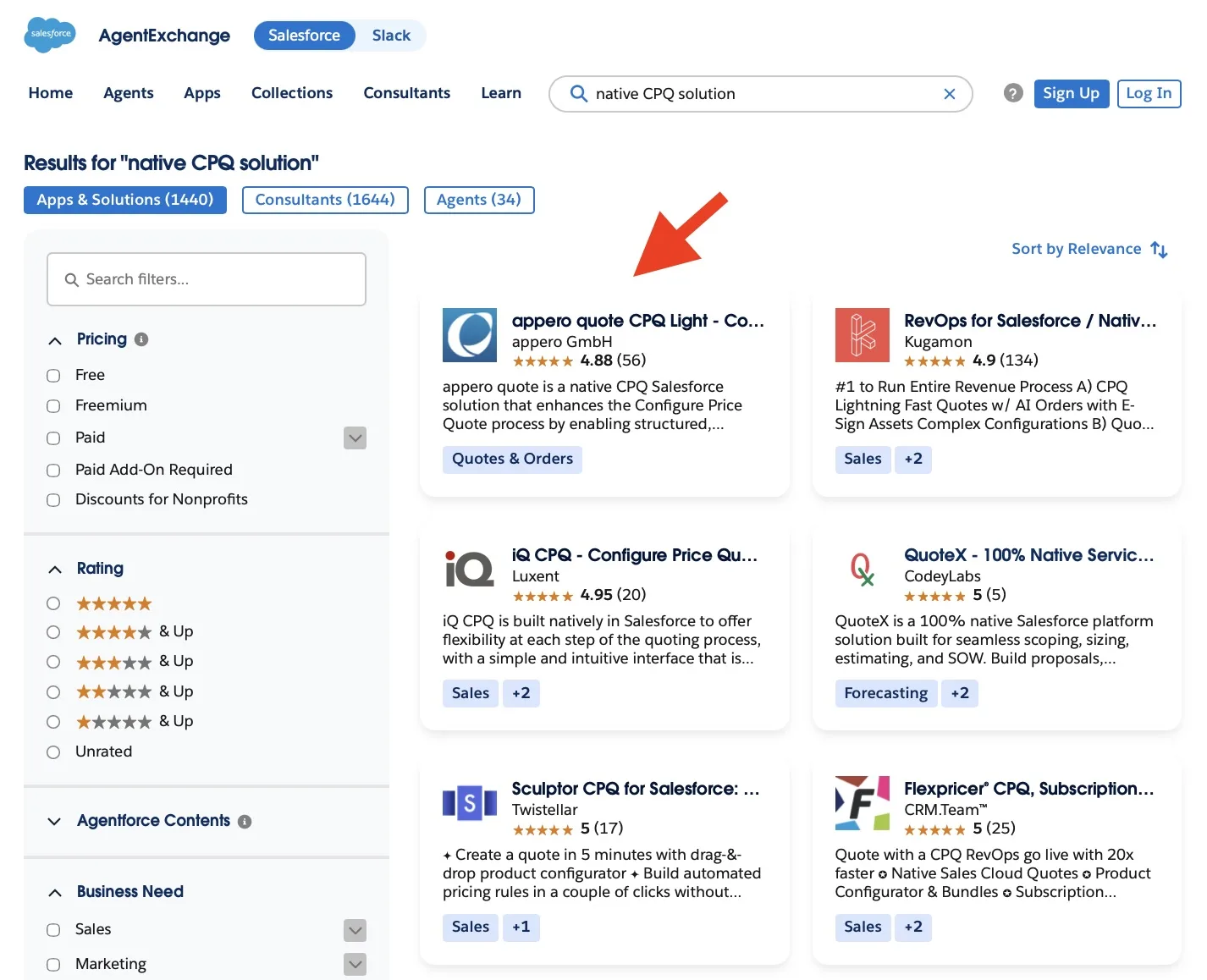
For this comparison, we chose appero quote CPQ Light because its approach is materially different from a broader revenue platform. It is a native Salesforce application that works directly with Salesforce products, price books, opportunities, and quote data. Its core design focuses on configuring products for a quote, calculating prices and discounts, and producing the final offer document inside Salesforce.
Can a Native Salesforce CPQ App Replace Revenue Cloud?
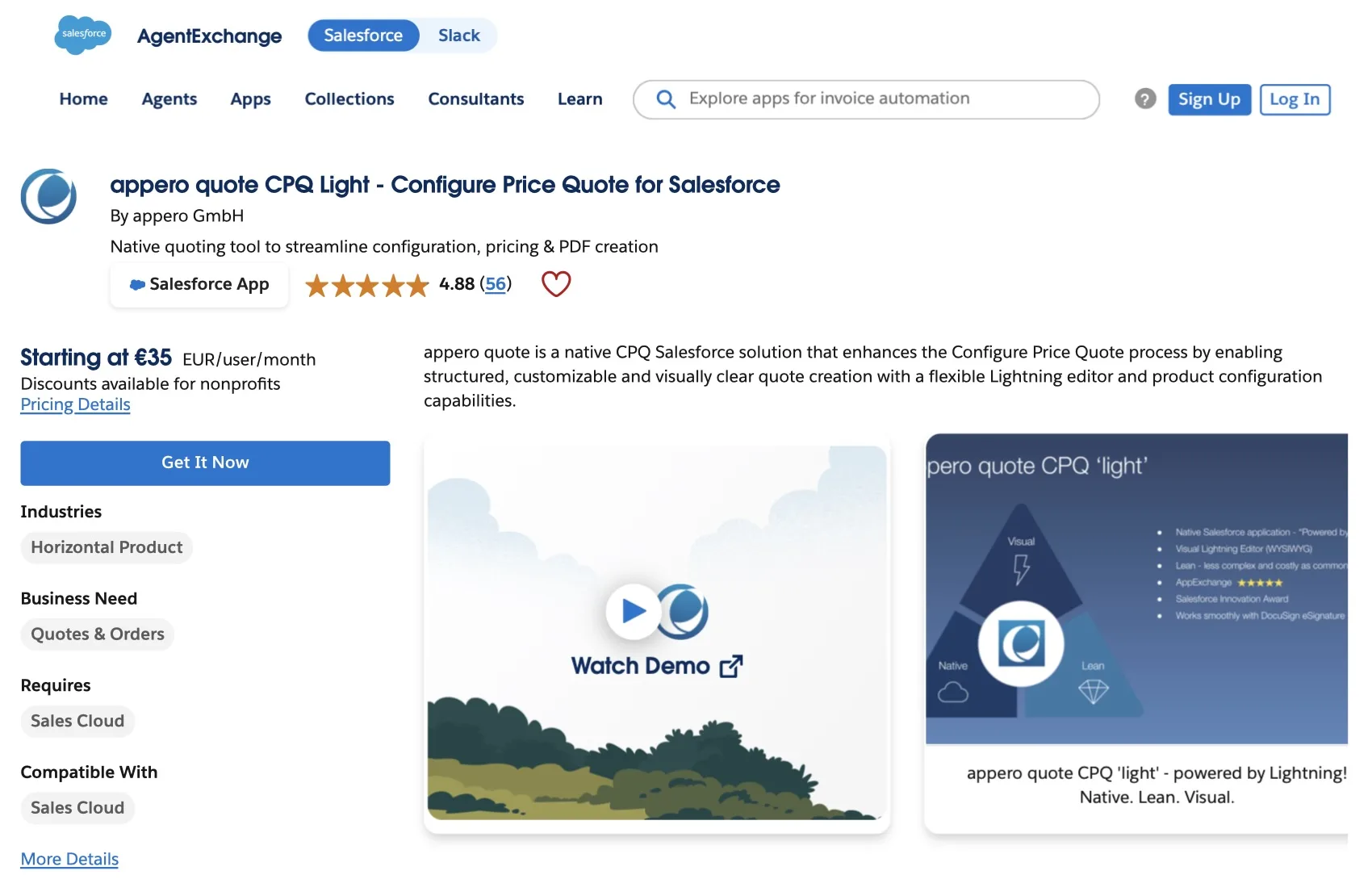
If a company only needs the CPQ capabilities required for its quoting process, a more focused Salesforce application can be an alternative to adopting the broader Revenue Cloud platform. appero quote CPQ software starts from the Salesforce Opportunity and uses Salesforce Products and Price Books as the source of commercial information. Users can configure the products required for the customer, apply pricing and discount calculations, build the quote in the Lightning Editor, and generate the final offer document without moving the quoting process into a separate system.
Appero quote on AppExchange
- Salesforce-based administration.
appero quote includes a guided Setup Assistant that walks administrators through the main configuration steps, including quote numbering, Product Groups, quote templates, Opportunity integration, user access, and permissions.
Setup Assistant
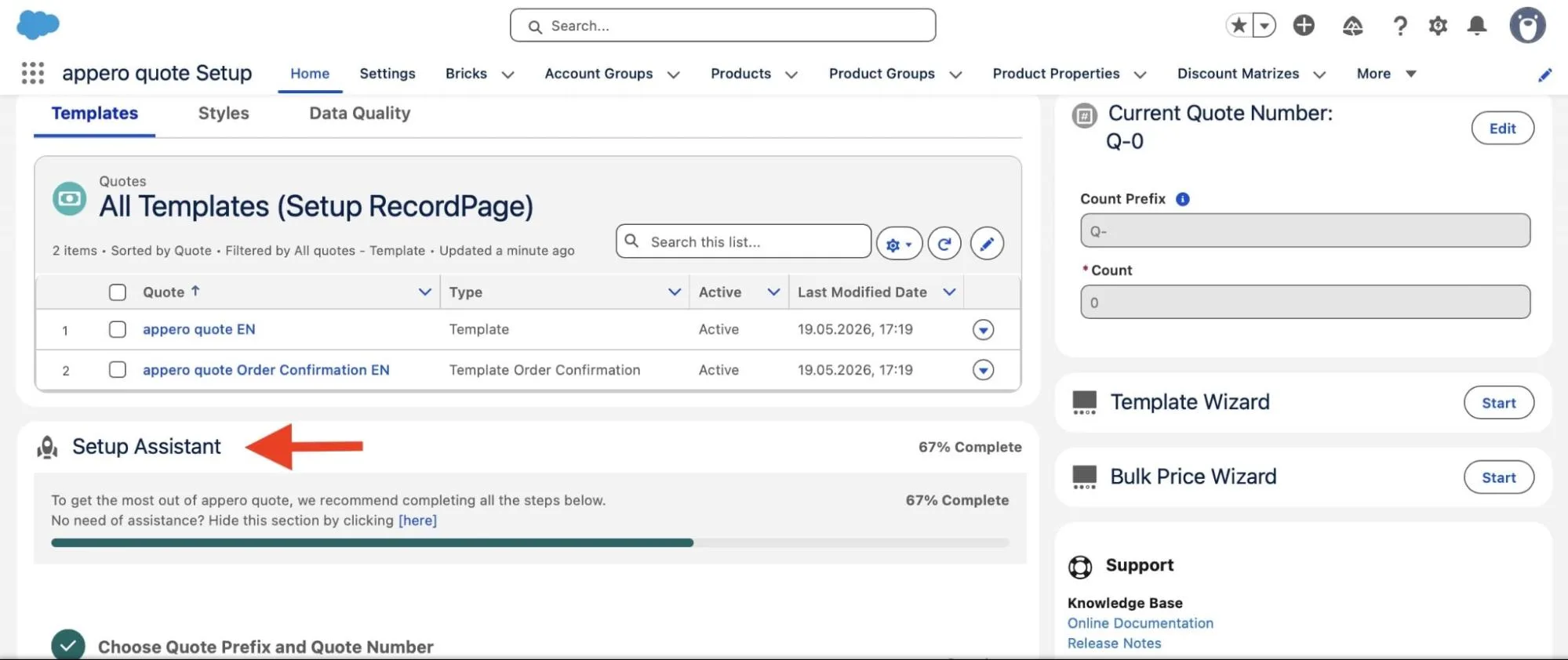
The Setup Assistant can also assign the Salesforce page layout needed to add appero quote to the Opportunity workflow, including the “New Quote” button and “Quotes” related list. If an organization uses a highly customized Opportunity layout, appero instead documents the fields and elements that need to be added to the existing layout.
Revenue Cloud has a broader implementation model. Salesforce recommends assembling a dedicated implementation team with the required Salesforce skills and notes that developers can be crucial to the implementation.
For a straightforward quoting process, the guided setup can reduce the amount of specialist work needed for configuration and administration. This makes appero quote particularly relevant when the goal is to add a quoting process to an existing Salesforce sales setup without taking on a larger Revenue Cloud implementation.
- Product configuration.
Revenue Cloud includes Product Configurator as part of its CPQ capabilities. It allows users to configure products and product bundles by selecting options, setting quantities, and applying configuration rules and constraints. Pricing can also be updated as the configuration changes.
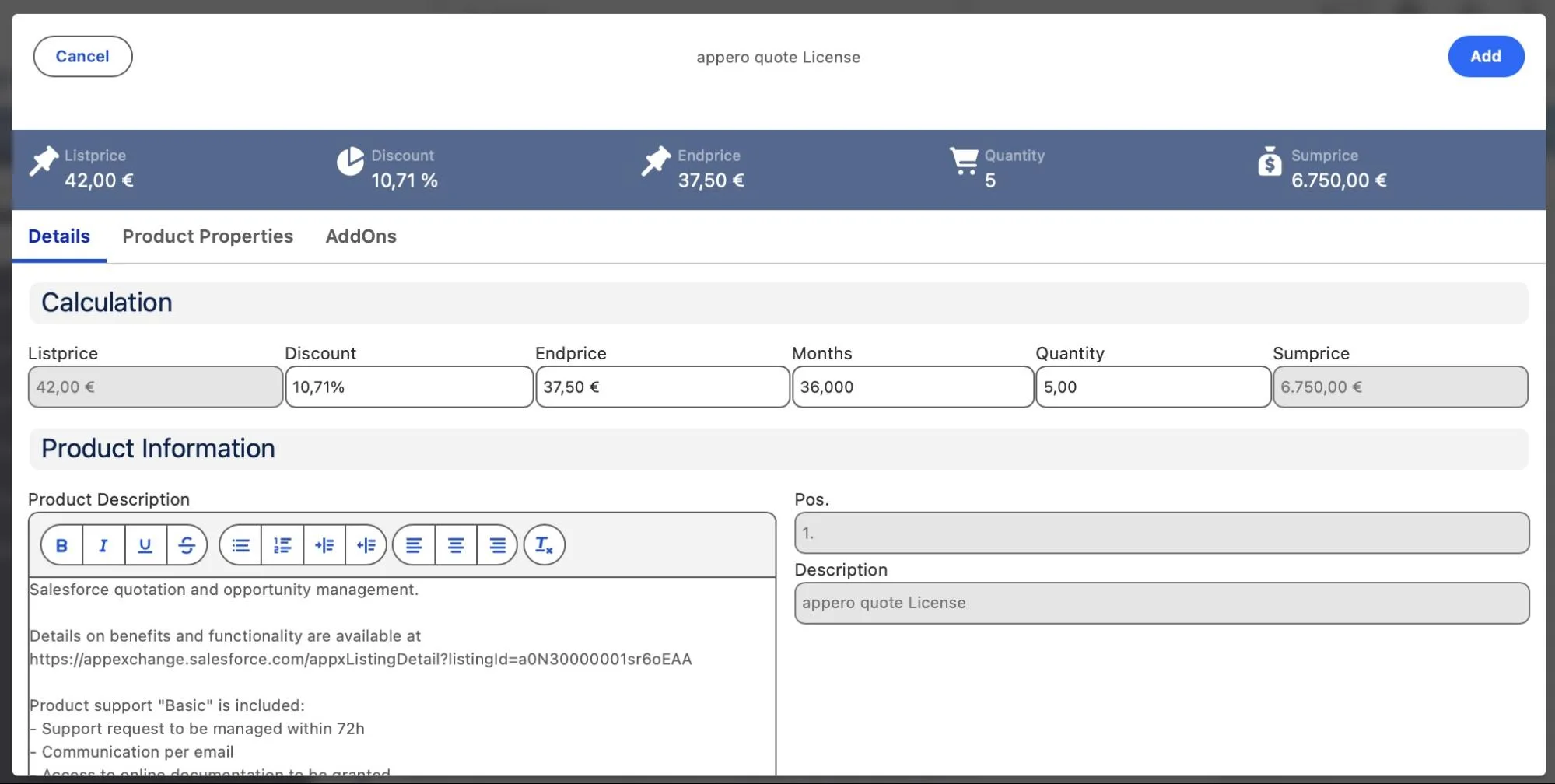
appero quote provides product configuration through Product Groups, product properties, and Bundle Products. Product Groups can be used to configure product attributes and apply different calculation options in the background. Product Properties can influence the price or provide product information without affecting the calculation, with different property types available for price calculations, bulk pricing, and other configuration requirements.
The key difference is the configuration model. appero quote is a good fit when the product catalog and available combinations can be defined in the Salesforce setup and sales users mainly need to select and configure those products when creating a quote. Revenue Cloud is a better fit when product selection depends on more complex rules that need to be evaluated dynamically during configuration.
Product information
- Pricing and calculations.
Revenue Cloud uses Salesforce Pricing to calculate product prices and apply pricing adjustments. Pricing procedures allow companies to define rules and formulas for calculating the final price, including discounts and other pricing adjustments.
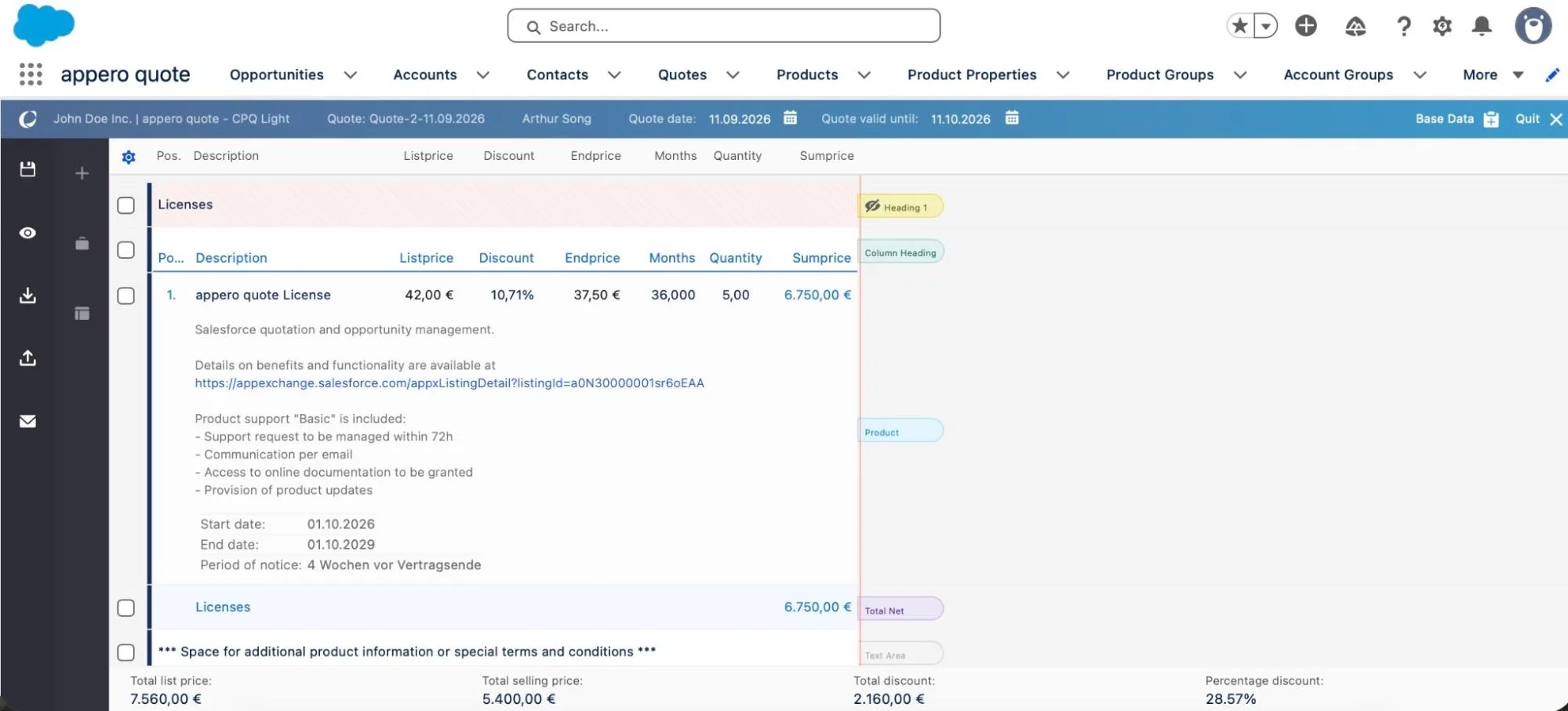
appero quote supports price calculations in Salesforce, including markups and markdowns, discounts, and price dependencies. Discounts can be applied at the quote-line level, with additional discount options available for the quote.
Total price and discount
For sales teams using established product and pricing structures, appero quote can provide the pricing logic needed to prepare and negotiate quotes without adopting a broader Revenue Cloud pricing model.
- Quote creation and management.
Revenue Cloud provides a dedicated process for creating and managing quotes in Salesforce. Users can create a quote from an Opportunity or from the Quotes tab, then use the Transaction Line Editor to add products, configure them, update quantities and discounts, and review pricing before finalizing the quote.
appero quote creates new quotes directly from the Opportunity record. Users can start a quote using the New Quote action or from the Quote related list, then select an existing quote or quote template before editing it. The Opportunity’s Account, Contact, and Price Book data are transferred to the new quote as its basic data.
Creating a Quote
For organizations that already manage sales around Salesforce Opportunities and primarily need to turn those Opportunities into customer quotes, appero quote keeps the quoting workflow closely tied to that existing process.
- Quote templates and PDF generation.
Revenue Cloud supports quote document generation through Document Builder, where companies can create and customize templates that control how information appears in customer-facing quote documents. PDFs can be generated directly from the quote record.
appero quote also provides quote template and PDF generation capabilities directly in Salesforce. Its Template Wizard guides administrators through creating a quote template, including CSS formatting and background images for the cover and subsequent pages. Administrators can then edit the template in the quote editor and control the formatting and information displayed in the document, including quote columns and Product Group content.
Template Wizard
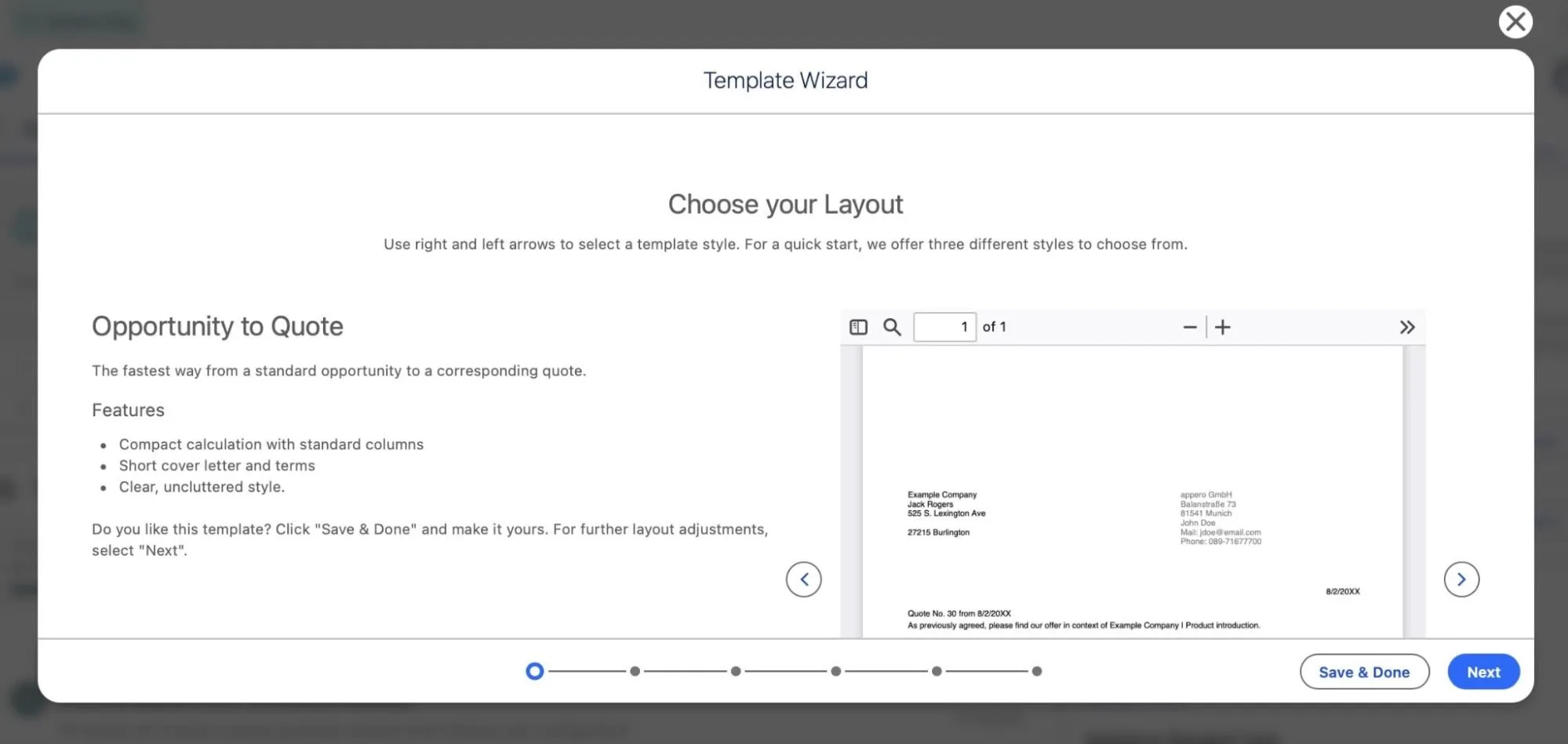
This makes appero quote particularly suitable when producing the customer-facing quote is a central part of the requirement, especially when administrators need control over the layout and presentation of the final document.
After comparing the main CPQ features, let’s look at the two solutions side by side to understand the key differences in implementation, administration, cost, and overall scope.
| Revenue Cloud vs. appero quote CPQ Light: Key Differences | ||
|---|---|---|
| Section | Revenue Cloud | appero quote CPQ Light |
| Primary approach | Revenue platform with CPQ, product configuration, pricing, quoting, and additional revenue capabilities depending on edition | Focused CPQ and quoting application |
| Main use case | CPQ as part of a wider revenue process, including order capture and subscriptions in Growth, with contracts, consumption, invoicing, and other capabilities in Advanced | Product configuration, pricing and discounts, quote creation, and customer-facing quote documents in Salesforce |
| Implementation scope | Can extend beyond CPQ depending on the Revenue Cloud edition and the capabilities being implemented | Focused on the quoting process and its Salesforce configuration; can be combined with Salesforce-native solutions such as JustOn for billing and subscription management |
| Administration | Requires configuration across the selected Revenue Cloud capabilities; Salesforce recommends an implementation team with the required Salesforce skills | Guided Setup Assistant for core quoting configuration |
| Best fit | Companies that need CPQ together with additional Revenue Cloud capabilities | Companies whose primary requirement is CPQ and quoting in Salesforce |
If your company does not need the wider Revenue Cloud capabilities, a dedicated CPQ application such as appero quote can be a better fit. It provides the core quoting functions sales teams need, including product configuration, pricing and discounts, Opportunity-based quote creation, and quote documents, without requiring the company to adopt a broader revenue platform.
How Much Can You Save on License Costs?
After comparing the main CPQ capabilities, let’s look at the license cost and see what the difference can be.
We already established the Salesforce Revenue Cloud pricing cost above. The question now is how that compares with appero quote. The app is priced per user per month, with the price per user decreasing as the number of license term and the number increases.
For 10 users, the license costs would be:
| appero quote vs. Revenue Cloud License Cost for 10 Users | ||
|---|---|---|
| 10 users | Monthly cost | Annual cost |
| Revenue Cloud Growth | – | $18,000 |
| Revenue Cloud Advanced | – | $24,000 |
| appero quote | From €360 | From €4,320 |
For a 10-user team, comparing the Salesforce Revenue Cloud license cost with the cost of appero quote shows a significant difference in recurring license costs.
Conclusion: Finding the Right Fit for Your CPQ Needs
Revenue Cloud makes sense when a company needs its broader revenue management capabilities. But if the requirement is primarily product configuration, pricing, discounts, and quoting, the business may not need the full Revenue Cloud platform to support that process.
Salesforce CPQ is no longer available to new customers, but companies do have other options. As the comparison with appero quote shows, a native Salesforce application can cover the CPQ and quoting capabilities discussed in this article at a lower license cost.
This makes it important to consider both Revenue Cloud cost pricing and the actual functionality the business needs before choosing a solution, as the right choice depends on what the business actually needs. If Revenue Cloud’s broader capabilities are required, its cost may be justified. If the requirement is focused on CPQ and quoting, a more focused solution can provide the required functionality without paying for capabilities the business does not need.