

CodeIgniter remains a popular choice for building lightweight, fast PHP applications, and pairing it with Docker has become a standard approach for teams that want predictable, repeatable deployments. Docker packages an application along with its dependencies, PHP version, and server configuration into a single container that behaves the same way on a developer’s laptop as it does on a production server. This matters because PHP applications often break in subtle ways when moved between environments with different extension versions or configuration files. By containerizing a CodeIgniter project, teams remove much of that unpredictability. The application, its runtime, and its supporting services all travel together, which simplifies onboarding, testing, and scaling. For businesses running CodeIgniter at any meaningful scale, this combination has shifted from a nice-to-have to a practical requirement for reliable delivery.
Key Benefits of Dockerizing Your CodeIgniter Application
Running a CodeIgniter application inside Docker containers brings several practical advantages that extend beyond convenience. The first is consistency: every environment, from a developer’s machine to staging and production, runs identical PHP versions, extensions, and system libraries. This removes the common excuse of “it works on my machine” and replaces it with a shared, verifiable setup. The second benefit is scalability. Containers can be replicated horizontally behind a load balancer, allowing an application to handle increased traffic without manual server reconfiguration. Third, Docker speeds up onboarding significantly. New team members can clone a repository, run a single command, and have a working local environment within minutes rather than spending a day installing PHP versions, web servers, and database clients. Additional benefits include:
- Simplified rollback to previous application versions using tagged images
- Easier integration with continuous integration and deployment pipelines
- Cleaner separation between application code and infrastructure configuration
These advantages compound over time, particularly for teams maintaining multiple CodeIgniter projects with differing dependency requirements.
Setting Up a Dockerfile for CodeIgniter PHP Projects
A Dockerfile defines how a CodeIgniter application gets built into a container image. The process starts with selecting a base image, then layering in required PHP extensions such as mysqli, mbstring, and intl, which CodeIgniter commonly depends on for database access and string handling. After the extensions are installed, Composer is used to pull in any third-party packages the project relies on, followed by copying the application source code into the image. File permissions also need attention at this stage, since CodeIgniter writes to its cache and logs directories, and misconfigured ownership is a frequent source of runtime errors. Teams that lack in-house Docker experience often choose to hire dedicated Сodeigniter developers who already understand these configuration details and can avoid common setup mistakes from the outset. Getting the Dockerfile right early prevents a long list of debugging sessions later in the project.
Choosing the Right PHP Docker Image for CodeIgniter
There are two common base image choices: php:fpm and php: apache. The fpm variant pairs with a separate Nginx container and generally performs better under load, while the apache variant bundles the web server directly into the same container, which is simpler but less flexible. Alpine-based images are smaller and start faster, though they sometimes require extra steps to install certain PHP extensions compared to Debian-based images, which offer broader compatibility with less configuration effort.
Configuring Docker Compose for CodeIgniter and MySQL
Docker Compose allows a CodeIgniter application, its web server, and a MySQL database to run as separate but connected services. Each service is defined in a single YAML file, with a private network created automatically so containers can communicate using service names instead of IP addresses. Environment variables handle database credentials and connection details, keeping sensitive values out of the application code itself.
Best Practices for CodeIgniter Docker Deployment
Successful CodeIgniter Docker deployments follow a consistent set of habits that reduce risk and simplify maintenance. Keeping containers stateless is one of the most important principles: application code and configuration should live in the image or environment variables, while user-uploaded files and session data belong in mounted volumes or external storage services. This separation allows containers to be destroyed and recreated without data loss. Version pinning is another habit worth adopting; specifying exact PHP and package versions in the Dockerfile prevents unexpected behavior when base images receive updates. Logging should be directed to standard output rather than local files, since container orchestration tools are built to collect logs this way, making troubleshooting far simpler across distributed deployments.
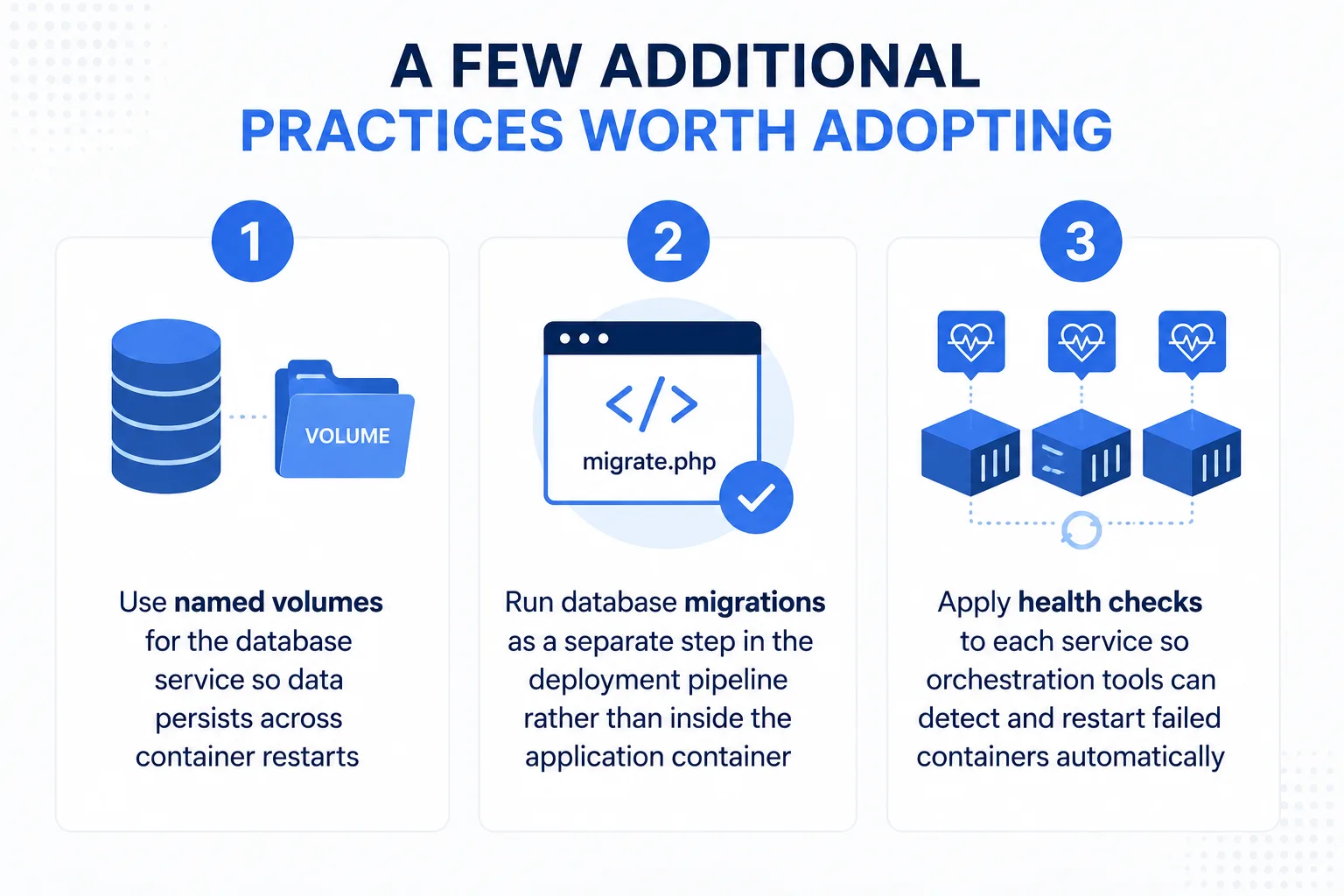
Following these habits consistently across projects makes deployments predictable rather than a source of last-minute surprises.
Managing Environment Variables and Configuration Securely
CodeIgniter applications typically rely on a handful of sensitive values: database credentials, API keys, and encryption strings. Storing these directly in code or committing them to version control creates unnecessary risk. Instead, a .env file should hold these values locally, while production environments pull secrets from a dedicated secrets manager or the orchestration platform’s built-in secret storage. CodeIgniter’s own configuration system supports environment-based overrides, allowing the same codebase to behave differently in development, staging, and production without code changes. It also helps to separate configuration by concern rather than lumping everything into one file; database settings, third-party API credentials, and application-level flags can each live in their own clearly named variables. Teams should also rotate credentials periodically and restrict which environments have access to production secrets, since limiting exposure reduces the damage a single leaked credential can cause.
Optimizing Docker Images for Production-Ready PHP Apps
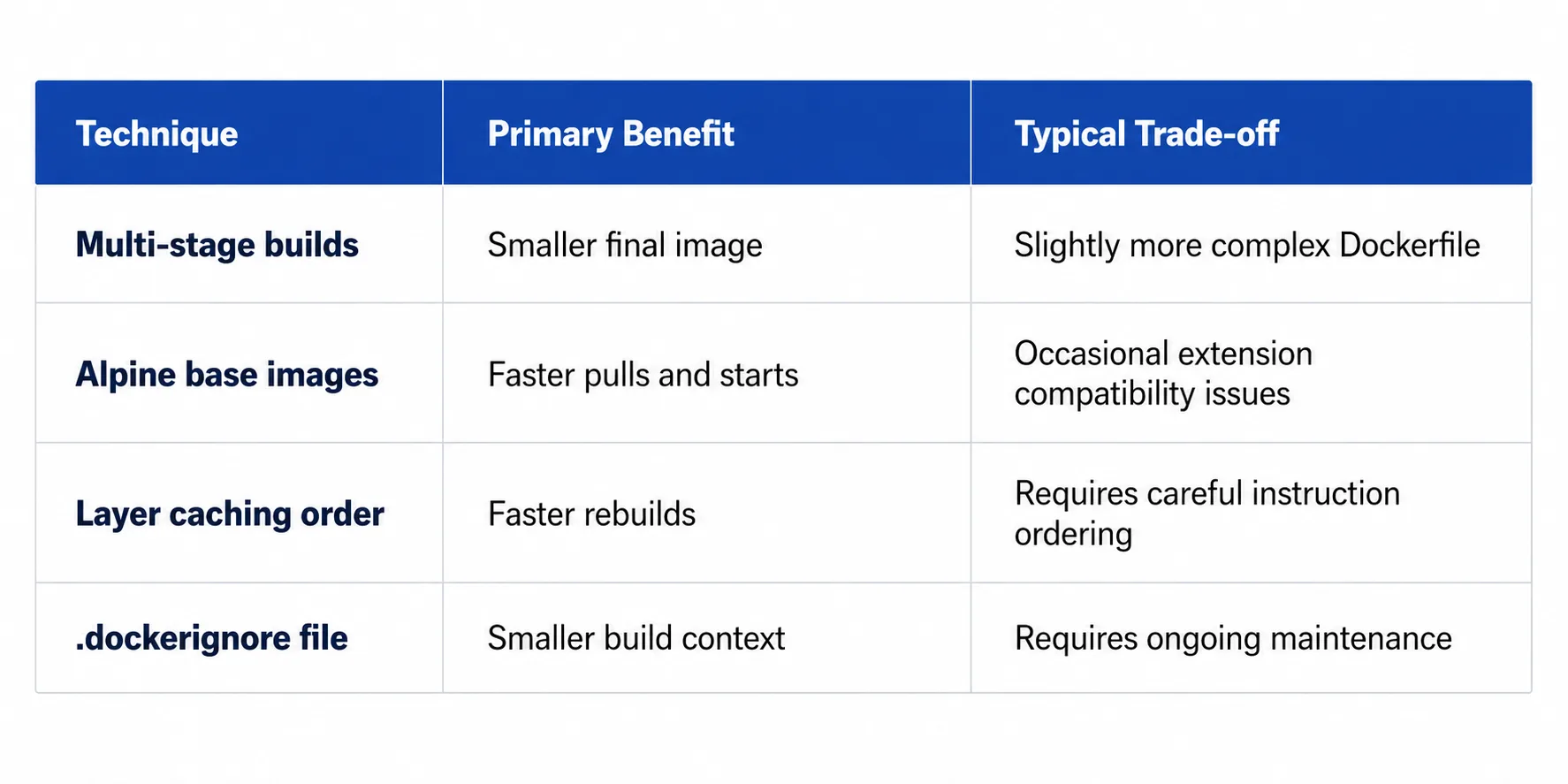
Production images should be as small and fast as possible. Multi-stage builds are one of the most effective techniques for achieving this: an initial build stage installs Composer dependencies and compiles any assets, while a final, lighter stage copies only the necessary files into the production image, leaving build tools and temporary files behind. This reduces both image size and the potential attack surface. Layer caching also plays a meaningful role in build speed; ordering Dockerfile instructions so that rarely-changing steps, such as installing system packages, come before frequently-changing steps, like copying application code, allows Docker to reuse cached layers and avoid rebuilding everything on every change. Many organizations bring in Docker experts specifically to audit image size and build times, since even minor reordering of Dockerfile instructions can meaningfully shorten deployment cycles. Comparing common optimization techniques side by side illustrates their relative impact:
Common Challenges When Deploying CodeIgniter with Docker (and How to Fix Them)
A few recurring issues tend to surface when CodeIgniter runs inside containers. File permission errors are among the most common, typically caused by mismatched user IDs between the host system and the container; setting explicit ownership during the build process resolves most of these cases. File uploads present another challenge, since files written inside a container disappear once that container is removed; mounting a persistent volume for the uploads directory keeps user content intact across deployments. Session handling can also cause confusion in multi-container setups, since PHP’s default file-based sessions do not work across separate containers; switching to database-backed or Redis-backed sessions solves this by giving every container access to the same session store, regardless of which instance handled the original request.
Conclusion: CodeIgniter Deployment with Docker
Combining CodeIgniter with Docker gives PHP applications a consistent, portable foundation that holds up across development, testing, and production. From selecting the right base image to managing secrets securely and optimizing build performance, each decision covered here contributes to a deployment process that is easier to maintain and less prone to environment-specific failures. Teams that apply these practices consistently, rather than treating containerization as an afterthought, tend to spend far less time firefighting deployment issues and more time building features. Getting the foundation right from the start pays off with every future release.